
AI Tracking For Tree Service Companies: When a Tree Comes Down, Does AI Give Them Your Number?
See whether ChatGPT, Gemini and Google AI recommend you for removal, trimming and emergency storm work — and fix it when they don’t.
- ✓ One score across all six AI engines for your service area
- ✓ Diagnose why another tree company gets recommended
- ✓ Track removal, trimming and emergency searches separately
As seen on

Watch a 2-Minute Walkthrough
See exactly how BFE scans your visibility across every AI engine — and hands you the plan to fix it.
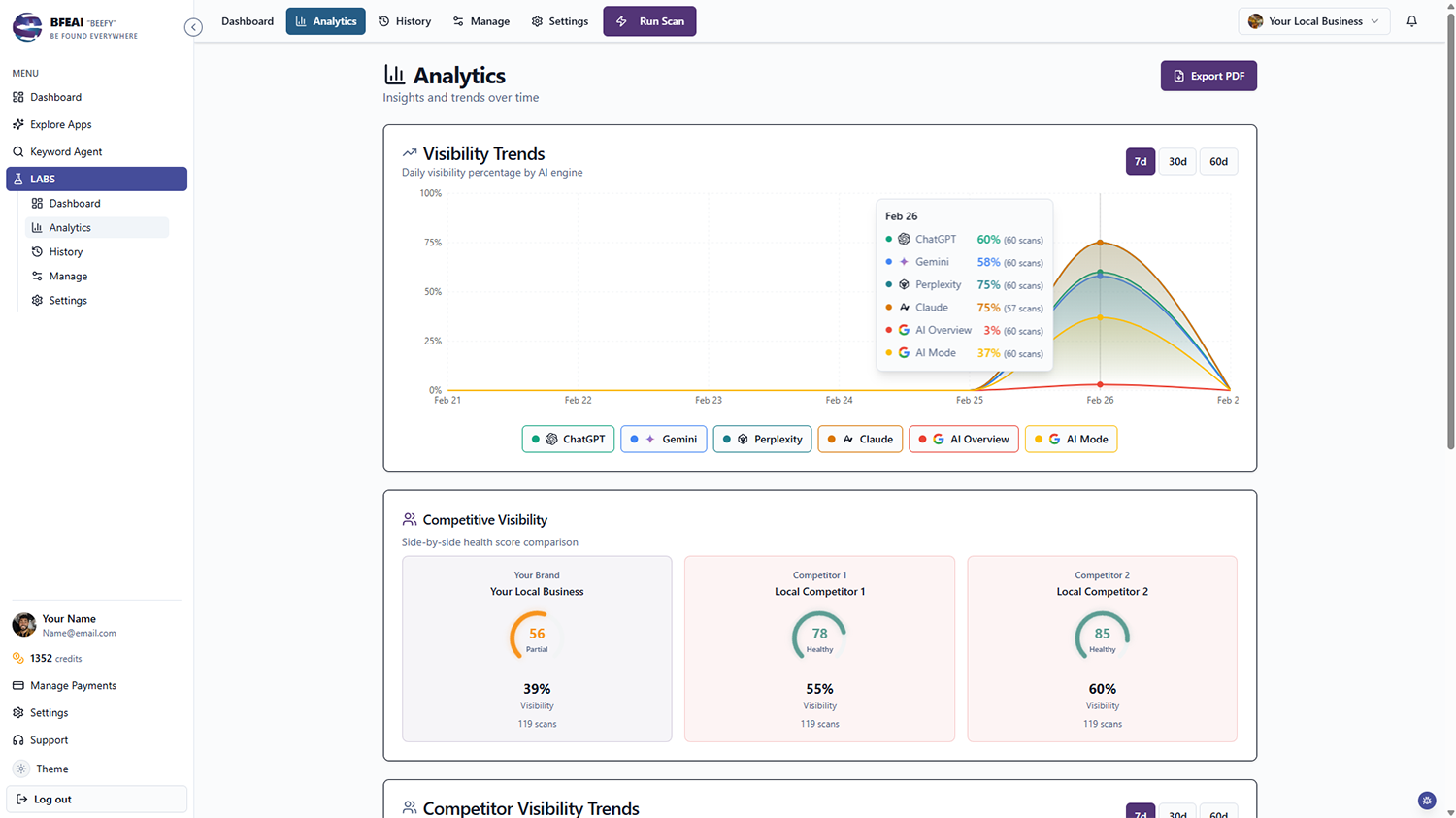
BFE shows tree service companies whether AI tools like ChatGPT, Gemini and Google’s AI Overviews recommend them when homeowners search for tree removal, trimming or emergency storm cleanup.
You get one clear visibility score across all six engines for your service area.
When another company is named instead, Diagnose explains why and returns a step-by-step plan to close the gap.
Storm Work Is Won in Minutes — by Whoever AI Names
A tree on the roof is an emergency. The homeowner asks, acts, and calls whoever appeared in the answer.
Missing on Emergency Answers
You rank for "emergency tree removal" but aren’t in the AI answer after a storm.
Large Removals Lost
Big, technical removals are your best margins and completely untracked in AI answers.
Credentials Unmeasured
Insurance and certification drive AI citations, but you can’t see which signals are missing.
Know Whether AI Sends Removal and Storm Work to You
Your Emergency Scorecard
One dashboard showing whether each engine recommends you for removal, trimming and emergency work.
See LABS →Why the Other Company Won
See which tree company is recommended instead, why they win, and the steps to close it.
How Diagnose works →Storm-Season Trend Lines
Schedule scans so you can watch visibility move when storms drive a surge.
See scheduling →Find the Tree Terms That Convert
Use Keyword Agent to surface the tree service searches worth winning in your market.
See Keyword Agent →Checking Tree Service Answers by Hand vs. BFE
| Checking it yourself | With BFE | |
|---|---|---|
| Emergency vs. planned trimming | One blended check | Scored as separate keywords |
| The crew that got dispatched | Never find out | Identified, with the winning signal |
| Insurance and certification signals | Never assessed | Flagged when they’re what’s missing |
| Large technical removals | Lost in generic terms | Scored on their own |
| What you do next | Wait on the next referral | Work the fix list yourself |
Why Tree Work Is Won Inside the AI Answer
Tree work splits into planned trimming and outright emergencies, and both now start conversationally. A homeowner describes the situation — a leaning trunk, a limb on the roof — and the AI assistant returns a couple of local companies with reasons attached.
Rankings alone don’t decide that. AI engines weigh review recency and volume, insurance and certification signals, Google Business Profile completeness, directory presence, brand mentions and how clearly your site covers removal, trimming and emergency response.
From Invisible to Recommended
BFE scans all six engines anonymously, so you see the answer a real homeowner gets rather than one personalized to you, reduced to a single health score.
When you’re missing, Diagnose returns the reason for one credit — which company is cited, the signals behind it, and the steps to close the gap. Schedule scans and watch the score climb.
From Not Named to First Truck on Site
A visibility score is only the start. When AI isn’t recommending your tree company, Diagnose gives you a plain-language plan you can act on this week — no agency required.
Scan Emergency and Planned Work
Run removal, trimming and storm-cleanup keywords across all six engines — they behave nothing alike.
See Who Got Dispatched
One credit names the company recommended instead and whether insurance signals, reviews or content depth put them there.
Get the Fix List
BFE returns what to strengthen: insurance and certification visibility, emergency-response content, review cadence, city pages.
Re-Scan Before the Next Storm
Scheduled scans show your position ahead of the weather, not after it.
checked before the next storm
Storm work is assigned in minutes. Know now whether the engines hand it to you.
Read the case studies →I finally know whether AI recommends my business — and Diagnose told me exactly what to fix.

One Price, Every App, Every Agent
Every plan includes LABS, Keyword Agent, and every agent we launch — with a shared credit pool and 3-month rollover.
Lite
Lock in your price for life
- ✓500 credits
- ✓Access to all apps
- ✓3-month credit rollover
Plus
240% more credits than Lite
- ✓1,700 credits
- ✓Lock in your price for life
- ✓Access to all apps
Max
220% more credits than Plus
- ✓5,500 credits
- ✓Lock in your price for life
- ✓Access to all apps
Frequently Asked Questions
Can I track emergency work separately?
Yes. Add keywords like emergency tree removal, storm cleanup or tree trimming, and LABS scores each across all six engines.
How is this different from searching ChatGPT myself?
Your own searches are personalized to your account. LABS scans anonymously so you see the real-world answer.
What does the Diagnose feature do?
For one credit, LABS tells you why you’re not cited — who ranks instead, why, and a step-by-step plan to start showing up.
What if I don’t use all my credits?
Credits roll over for 3 months, which comfortably covers the quiet stretch between storm seasons.
Related Pages
LABS
Track AI-answer visibility across all six engines with scheduled scans and white-label reports.
Learn more →Keyword Agent
Find the search terms worth ranking for, then feed them into your visibility strategy. Next generation keyword research.
Learn more →OffPage Agent
Get spam free links created on autopilot. One click to get multiple layers of links, siphoning power straight from Google.
Learn more →